Is there a Windline app for Android, and how do I install it?
Updated
Yes. Windline for Android is free and downloads from windline.tech/android, because it isn’t on Google Play yet. Tap Download for Android, allow the install when your phone asks, and open it. You can follow events without an account. Every day is rated for the wind, with the 6 pm alert, a home-screen widget, Fly the route, clubs and live tracking.
What it does
- Every ride in one place: the events you follow, your own rides and the events you organise, each day rated Good, Fair or Tough for the wind, timed to when you’re on the road. See the Events screen.
- No account needed to follow: tap an event’s link and it opens in the app. A free account lets you set up events, join clubs and live track.
- An alert at 6 pm the evening before each ride. See notifications.
- A Today’s ride widget for your home screen, in three sizes. See the widget.
- Your own events, start to finish: set them up, add GPX routes, publish and share them, all in the app. See setting up an event.
- Fly the route: a 3D satellite flyover of any day, with the wind at the hour you’ll be there. See Fly the route.
- Live tracking from your phone: share one link and anyone follows you on a satellite map, with the wind and weather where you are. See live tracking.
- Clubs, share images, the Windline 1000 and the historic weather for days that are too far ahead for a forecast.
It’s free and needs Android 8 or newer.
Install it
Windline isn’t on Google Play yet, so it downloads from windline.tech. Your phone checks with you before installing an app from outside Google Play; here’s what you’ll see.
On your phone, open windline.tech/android and tap Download for Android.
Chrome may say the file might be harmful. It says this about every app from outside Google Play. Tap Download anyway.
Open the download. The first time, Android asks to allow installs from Chrome: tap Settings, switch on Allow from this source, then go back.
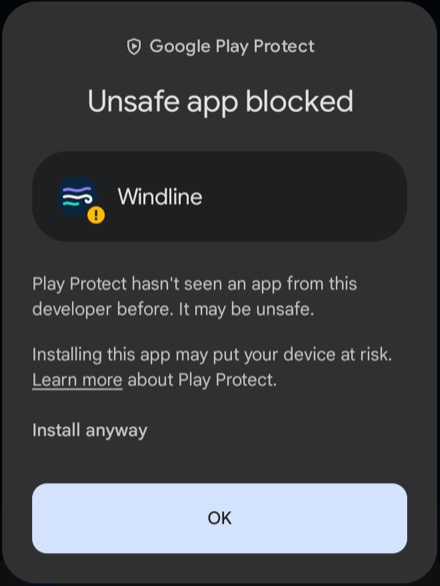
Android shows Unsafe app blocked: “Play Protect hasn’t seen an app from this developer before.” Google says this about every app from outside Google Play whose developer it hasn’t verified yet. Don’t tap OK, because that cancels the install. Tap More details, then Install anyway.
Open Windline. Choose your units and try the demo tour, or tap Skip. Carry on without an account, or sign in with the same account as on windline.tech or the iPhone app: open Settings and tap Sign in or create an account, and your events are there. See getting started.
Updates
There’s no store to update it, so the app checks for itself. When there’s a new version, a card at the top of Events says A new version of Windline is ready. Tap its Update to … button. The first time, Android asks you to allow installs from Windline: switch on Allow from this source, go back and tap the button again. Then tap Update when Android asks.
Is it safe?
It’s the same Windline, signed by Windline and downloaded from windline.tech. The warnings are Android’s standard check for any app from outside Google Play. Only download it from windline.tech.
Find your way round
Getting started
Following rides
Your own rides and events
Fly the route and live tracking
Clubs and Strava
Alerts, widget and settings
Your account
iPhone and the web
Windline is also on the App Store for iPhone, and everything except live tracking works in any web browser at app.windline.tech. See is there an app?