Know the wind before you ride.
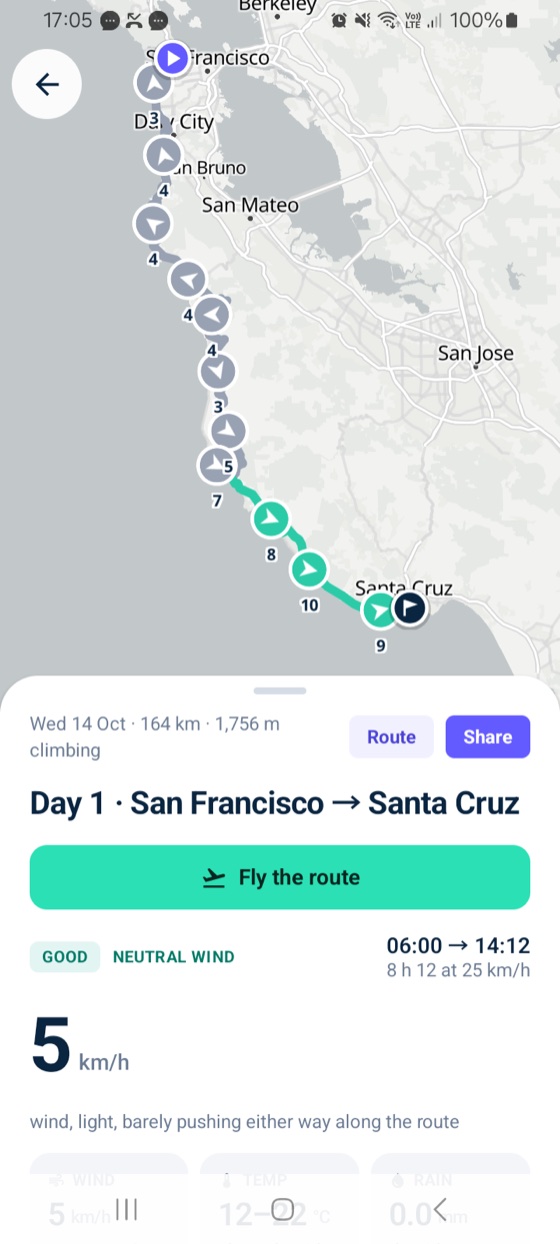
Every day of your ride rated Good, Fair or Tough for the wind, with the headwind, gusts, rain and heat for the hour you’ll reach each stretch of road. Fly the route in 3D before you go, get the heads-up the evening before, and let family follow you live on the day.
Download for AndroidIt isn’t on Google Play yet, so it downloads from here. Your phone asks you to allow the install: the steps below show each screen.
What it does
Good, Fair or Tough, with the reason in plain words. The headwind, gusts, rain and heat are timed to when you’ll be on each stretch, not just where you start.
Ride it before you ride it: a 3D satellite flyover of the day, with the wind, gusts, rain and heat at your hour, and the climbs ahead.
At 6 pm the night before each ride: the rating, the reason and the weather, so you know what to wear and where to sit in the bunch.
A widget with the rating, the wind and your start time, so the day’s ride is a glance away.
Open any Windline link to follow an event, or set up your own from a GPX file and share one link with the group.
On the day, family and friends follow you on a satellite map with the wind and weather where you are. It keeps going with the screen off.
Install it
- Download
Tap Download for Android above on your phone. Chrome may say the file might be harmful: that’s what it says about every app from outside Google Play. Tap Download anyway.
- Allow the install
Open the download. The first time, Android asks to allow installs from Chrome: tap Settings, switch on Allow from this source, then go back.
- Get past Google’s warning
Android shows Unsafe app blocked, because Google hasn’t seen an app from Windline before. Don’t tap OK: that cancels the install. Tap More details, then Install anyway.
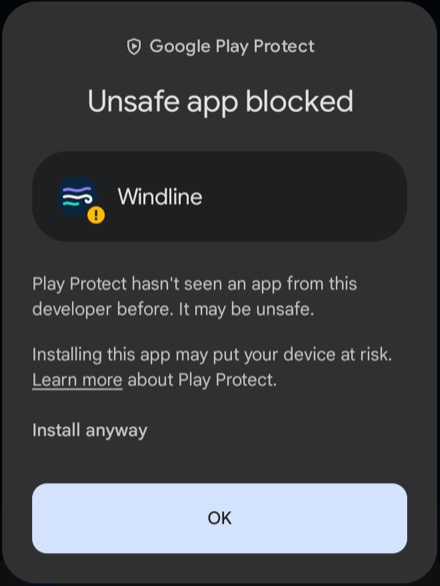
Tap Install anyway, not OK. - Open Windline
Follow any event straight away, no account needed. To see your own events, sign in with the same account as on windline.tech or the iPhone.
Good to know
Why does Android say it’s unsafe?
Google warns about every app installed from outside Google Play whose developer it hasn’t verified yet. Windline is signed by Windline and is the same app as on the iPhone. We’re registering with Google’s developer verification so the warning goes away.
Why isn’t it on Google Play?
Not yet. For now it downloads straight from windline.tech: the same app, signed by Windline.
How do I update it?
The app tells you when there’s a new version. Tap Update and it downloads and installs, in one go.
Does live tracking need anything else?
Allow location while using the app, and let Windline keep running in the background (Samsung asks once). See live tracking on Android.
Do my followers need the app?
No. Anyone with the link follows in any browser, on any phone or computer.
iPhone?
Windline is on the App Store. Search for Windline, or open any Windline link on your iPhone.
Does it cost anything?
No. Windline is free for riders and organisers. See what live tracking keeps.