How to get the wind forecast for your cycling route
Get the wind on every stretch of your own route at the hour you'll ride it, for a solo ride, a sportive or a tour.
The short answer
To get a cycling route wind forecast, load your route's GPX into a route-timed forecast app, set your start time and speed, and read the wind on each stretch at the hour you'll ride it: headwind, crosswind or tailwind, with gusts, rain and heat. A town forecast can't do this, because your route turns and the wind changes.
Key takeaways
- The wind that matters is on each stretch of your route, at the hour you reach it.
- You need three things, the route as a GPX, your start time and your average speed.
- Within about 10 days it's a live forecast; further out, use typical weather for the date.
- For a sportive, set your own pace, then check again the evening before and that morning.
Definitions
- Route-timed forecast
- A forecast that works out when you'll reach each part of your route and shows the weather for that place at that hour.
- Typical weather
- What a route has usually had on a date, at your riding hours, over the last ten years; a guide, not a forecast.
How do I get the wind forecast for my cycling route?
Load your route into a route-timed app, set when and how fast you'll ride, and read the wind on each stretch. Unlike a town forecast, a cycling route wind forecast tells you the climb is into the wind at 10:00 and the road home has it behind you at 14:00. For how the apps compare, see the best weather apps for cycling.
Here's how in Windline, free for riders, thanks to ProLend. It works for a ride, a sportive or a tour, anywhere.
- Get your route as a GPX. Export it from Strava, Ride with GPS, komoot or Garmin Connect, or download it from your event's site. See exporting a GPX from Strava.
- Add it to Windline. Sign in at app.windline.tech or in the Android app, create a ride, tour or race, and drop the GPX in, or paste a Ride with GPS link.
- Set your start time and speed. Pick the day, your start, your average moving speed and your stops. Windline times each stretch to when you reach it, slower on climbs.
- Read the day. The route is coloured by the wind when you'll be there, and the day is rated Good, Fair or Tough with the reason.
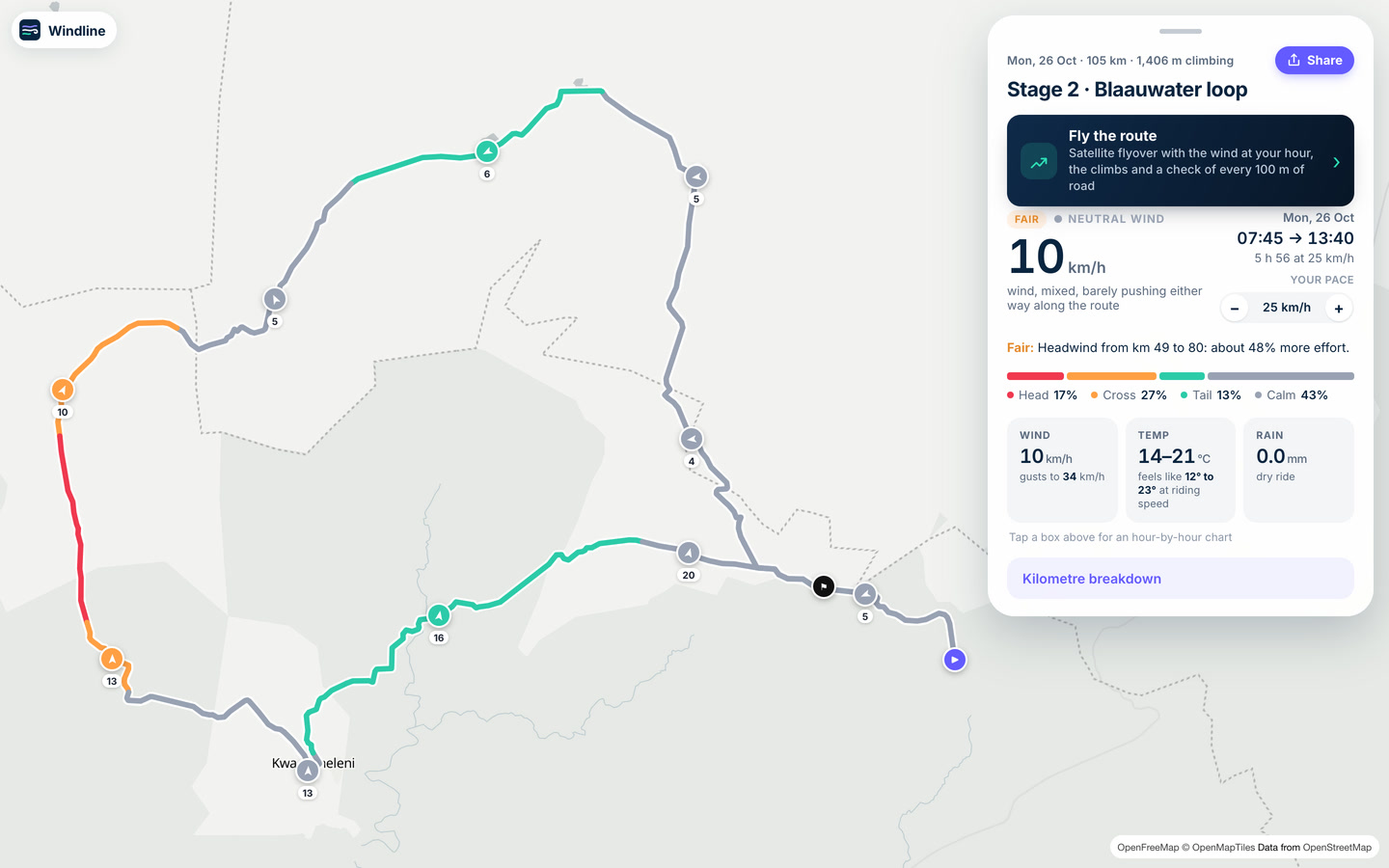
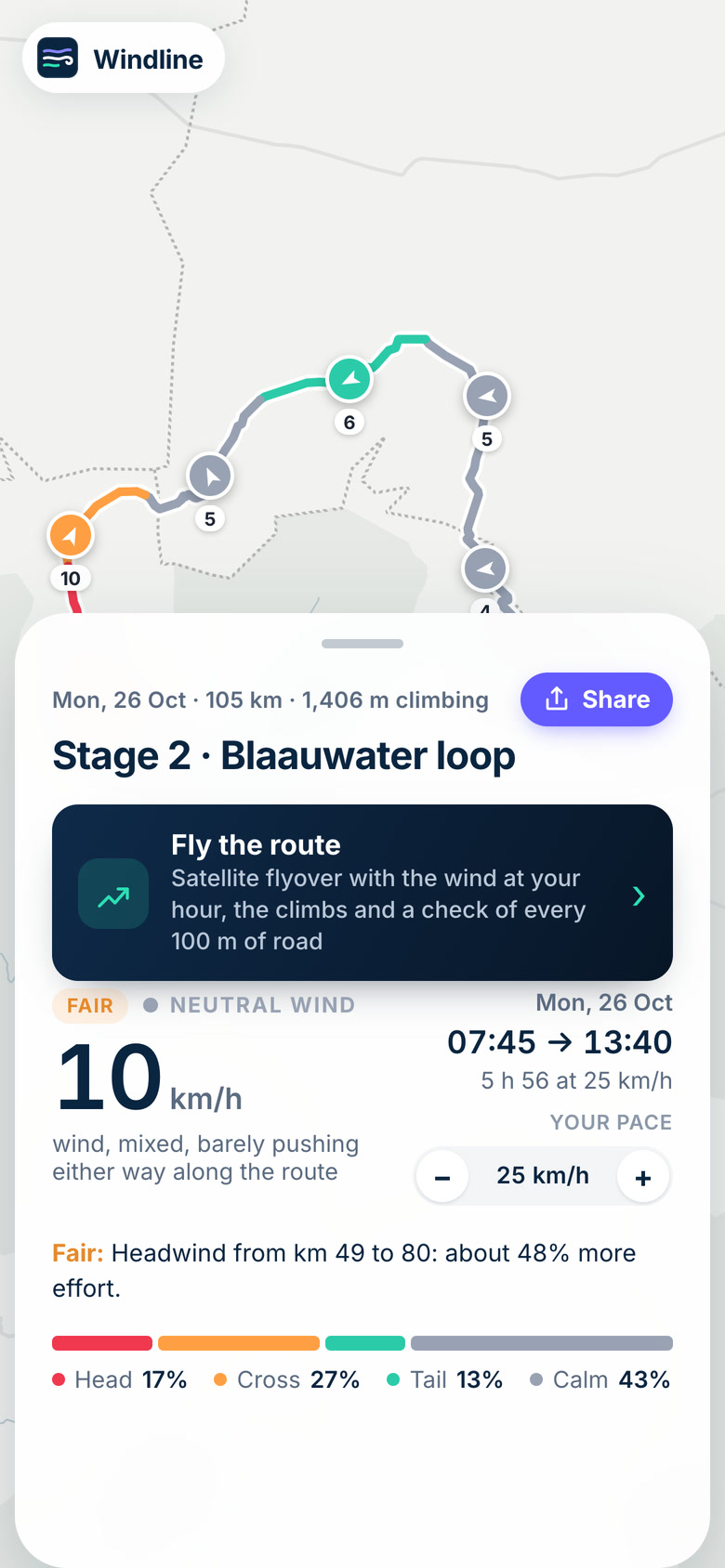
What will the forecast show for my route?
The wind and weather you'll ride in, in plain words, for stretches of up to 5 km (3 miles).
- The wind on every stretch, at the hour you'll be there. Red is a headwind, green a tailwind, and grey is side-on or calm.
- The rating: Good, Fair or Tough, from the extra effort the wind costs at your pace, side-on gusts, rain, heat and cold. A Fair or Tough day always says why.
- Where it hits, such as "Headwind from km 49 to 80: about 48% more effort". Our guide to how much a headwind slows you down explains the numbers.
- Hour by hour and kilometre by kilometre: the wind, gusts, temperature and rain through the ride.
- Fly the route: a satellite flyover with the wind at your hour, which you can make into a video.
Want this for your own route? Windline shows the wind for every stretch, timed to your pace. Free. Make a free ride page →
How do I check the wind for a sportive or gran fondo?
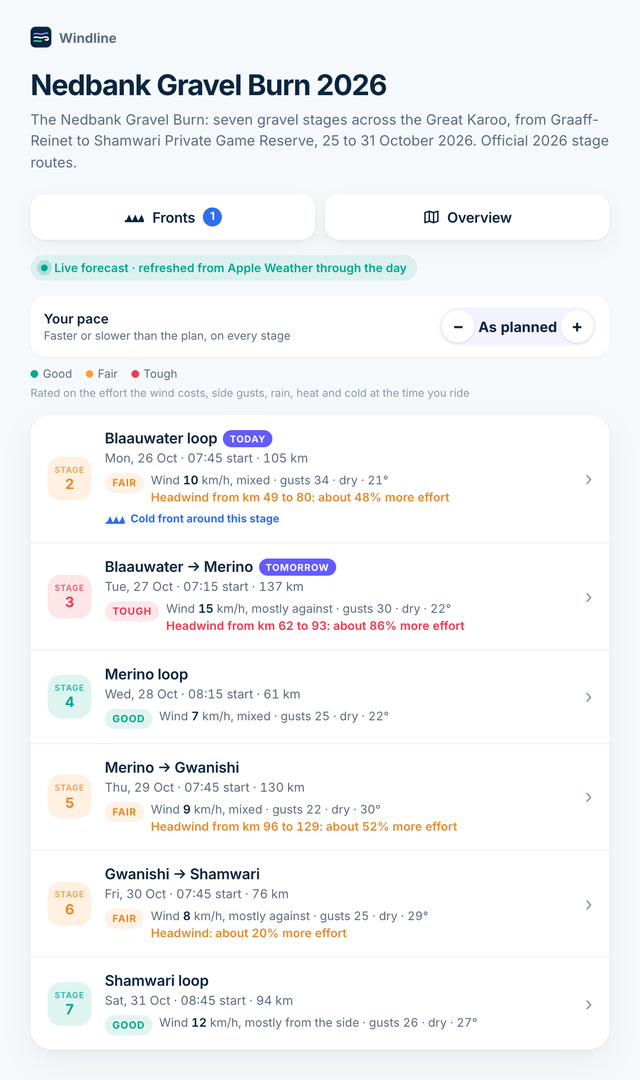
The same way, with two extra habits: set your own pace, and check again on race morning. Where the wind hurts depends on the course, your speed and your start: the same wind is a tailwind on the way out and a headwind on the climb home.
- If the event is on Windline, open its page: every stage is rated from the live forecast. Set Your pace faster or slower than the plan, and the times, wind and ratings follow.
- If it isn't, add the course's GPX yourself, with your start group's time and your speed.
- A week out, look at the pattern. The evening before, decide your start group, clothing and where to sit. On the morning, check the radar and official warnings.
Side-on gusts on an exposed road can make a day Tough with no headwind at all: see how windy is too windy to cycle. For a whole tour, see how to plan a cycling tour.
Can I get the wind for my route without an account?
Yes, with livedot in ChatGPT or Claude. Add livedot, attach your GPX and ask, for example: "What's the wind on this route on Saturday at 7, at 28 km/h (17 mph)?" You get the rating, the headwind and tailwind stretches, rain, temperature and a map coloured by the wind.
How do I check the forecast worked?
Check the timing before you trust the wind. The day shows the start and estimated finish, such as "06:00 → 12:03". If the finish looks wrong, fix your speed or stops. Times are the ride's local time, so check the time zone too.
Then check what you're reading. A filled rating is the live forecast. An outlined one with "Typical for 12 December" is typical weather from ten years of records, and switches to the live forecast about 10 days out.
Which app should I use for a route wind forecast?
Pick by the job. Epic Ride Weather is the most complete paid phone app, at US$19.99 a year after a 30-day trial, as of 26 October 2026. myWindsock turns the wind into effort. Windy's Distance & Planning tool takes a GPX if you set a speed. Windline is free and gives a group one link. See Epic Ride Weather alternatives and myWindsock alternatives.
Ready to try it? Add your route at app.windline.tech, set your start and speed, and share the link with your group. It's free, thanks to ProLend.
Frequently asked questions
How far ahead can I see the wind for my route?
In Windline, the live forecast from Apple Weather reaches about 10 days ahead and refreshes through the day. Further out, each day shows the typical weather for that date and those hours from ten years of records (Copernicus ERA5), labelled as typical, not a forecast. From 10 days out, the live forecast takes over by itself.
Does a route wind forecast use my own riding speed?
It should, or the timing is wrong. Windline times every stretch to your average moving speed and your stops, slower on climbs and faster on descents, so a headwind at 10:00 and a tailwind at 14:00 land where you'll actually be. On races and regular rides, each rider can set their own pace on the page.
Can I get the wind on a GPX without signing up for anything?
Yes, through livedot in ChatGPT or Claude. Add livedot, attach your GPX or paste a Ride with GPS link, and say when you'll start and how fast you ride. You get a Good, Fair or Tough rating, where the headwind and tailwind are, the rain and the temperature, with no account. Strava links don't work there, so export the GPX first.
When does the race-day forecast open for a sportive?
About ten days before the event, when the date comes within Apple Weather's forecast window. Before then, Windline shows the typical weather for that date and your riding hours, from ten years of records, so you can plan your start group and clothing early. Re-check the evening before and the morning of the ride, because forecasts sharpen as the day gets closer.
Can friends follow me live on the day of a sportive?
Yes. Go live from the Windline app or from your Garmin with the free livedot data field, and friends follow you on a map at livedot.me in any browser, with no app or account. If the sportive is a race on livedot, you appear on the race's own map too.
Get the wind for your ride.
Upload a GPX, add your start time and pace, and see the headwind, gusts, rain and heat for every stretch of the route, timed to when you’ll be there. Free for riders.
Make a free ride page →Sources and method
- Windline Help (2026). How the forecast is timed
- Windline Help (2026). When the forecast opens
- Windline Help (2026). Plan your route's weather with livedot
- Windline Help (2026). Set your own pace
- Apple (2026). WeatherKit data source attribution
- Copernicus Climate Change Service (ECMWF) (2026). ERA5 hourly data on single levels from 1940 to present
No calculations. Windline's features are described from its own help pages, checked on 26 October 2026, and the pictures are screens captured from Windline's live page for the Gravel Burn 2026 (a public race) on 25 and 26 October 2026. Other apps' features are from the makers' own sites and the US App Store, checked on 26 October 2026 and logged in our evidence file. We make no accuracy claims. Imperial conversions are rounded.
About the author
Wes Thomson, Founder, Windline. Wes Thomson builds Windline, live wind and weather forecasts timed to when riders reach each stretch of road. He built it for his own 2,093 km tour from Pont Drift to Cape Town, and writes these guides with the same focus: what the wind will do to your ride, and how to plan around it.